Inability to access the tutorial Git repos with AtScale Dev Edition

Hi AtScale Community,
I was able to successfully launch a docker container of the AtScale Dev Edition with enough cpu/ram resources and no terminal errors (all green). I was able to login enter my license key, and made sure that the Pool Status and Connection Status showed “Up”. What is strange even after waiting for a long time and stopping and restarting the container from scratch, when opening the Repo Browser, I only see this error "There are no GIT repositories defined that you can access. Please add one from the Settings menu." Within the settings menu I see all the public AtScale Tutotorial repos, and I even cloned one to my GIT and setup the personal access token to see if it would resolve the issue, but still no go. Wondering if there's any suggestions on how to fix this error?
Thanks,
Sean
Comments
3 comments
Hey Sean - can you check your user settings and make sure your token is saved there, also see if there are listed git repos - what version are you using (latest is 2025.1) ?
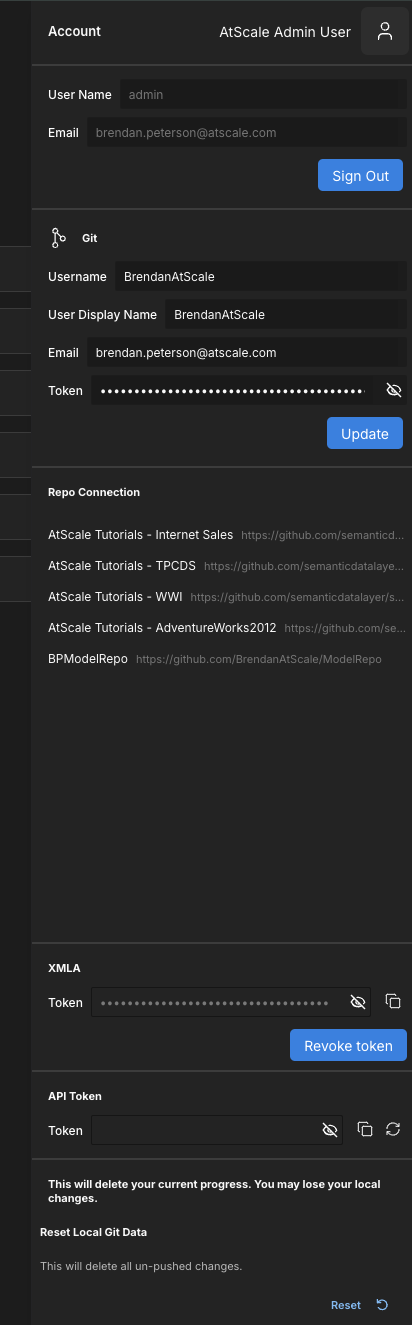
Thanks for the reply, sure thing I checked my version and it is C2025.1. The user settings tab does not show and git repo's, with or without my git token saved. Did try cloning a tutorial repo in my own git and that one also didn't show up.
Also uploaded my logs 342ad3af-9b48-45e6-a604-c53d96e5-engine-2025-03-05T1954.zip from today to see if that might help diagnose the issue.
Please sign in to leave a comment.